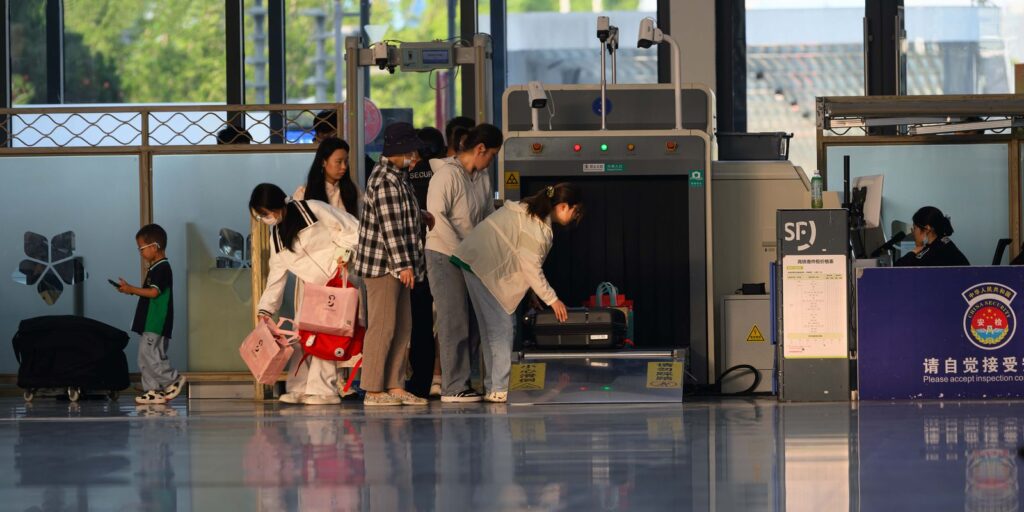
Electronics bigger than a cell phone have to come out of your bag at security. That is what electronics have to come out at airport security in one sentence: laptops, tablets, ereaders, gaming handhelds and standalone cameras each get their own bin in a standard lane. TSA PreCheck lanes and the newer CT scanner lanes are the exception.
Knowing which lane you are in changes what you need to do with your hands. A laptop packed against other dense items creates a cluttered X-ray image. So the standard rule isolates anything bigger than a phone.
According to TSA, PreCheck changes that. Members using a dedicated PreCheck lane may keep 3-1-1 liquids and laptops in their bag, no separate bin required.
The standard lane rule
The list of what electronics have to come out at airport security in a regular lane is short and specific. Anything larger than a smartphone comes out. A laptop, a tablet, an ereader, a handheld game console and a point and shoot or mirrorless camera all go into their own bin.
A phone, a smartwatch or a slim wallet stays in your pocket or your bag. TSA draws the line on size, not category. That is why a big phablet phone sometimes gets waved through and a small tablet does not.
Officers can ask you to remove any device at their discretion. That happens if the bin image looks unclear, no matter the size. That discretion is the one variable no rule fully covers.
PreCheck lanes: electronics stay in the bag
PreCheck exists partly to remove this step. In a dedicated PreCheck lane, precheck electronics stay in the bag. So do your shoes, belt, light jacket and your 3-1-1 liquids bag.
This only applies in an actual PreCheck lane with the PreCheck logo. Having PreCheck on your boarding pass is not the same thing. If the PreCheck lane is closed and you get routed into a standard lane, the standard rules apply again.
If you do not already have it, getting TSA PreCheck is the single biggest change you can make to this whole routine.
CT scanner lanes: everything stays put
Some airports now run computed tomography scanners. These build a rotating 3D image of a bag’s contents instead of a flat one. Where the machines are installed and staffed, travelers can often leave laptops and liquids in the bag even in a standard lane.
The catch: CT scanner lanes keep everything in only where the equipment is actually deployed and running that way. Not every airport has one, and not every lane at an airport that has one uses it that way. Signage at the belt, or an officer’s instruction, is the only reliable signal.
Travelers on forums describe real confusion here. The same person leaves a laptop in the bag at one checkpoint and gets stopped at another with the identical bag.
One checkpoint had CT screening and the other did not. That inconsistency is not a myth, it is the current state of a rollout that is still airport by airport.
The gray zone: Kindle, iPad, gaming handheld, camera
The rule is written around size. Several everyday devices sit right on the line.
| Device | Standard lane | PreCheck or CT lane |
|---|---|---|
| Basic Kindle or ereader | Usually stays in, similar to a phone | Stays in |
| Full size iPad or tablet | Comes out, treated like a small laptop | Stays in |
| Handheld gaming console | Comes out if roughly tablet sized | Stays in |
| Point and shoot or mirrorless camera | Comes out | Stays in |
Does a tablet count as a laptop at security? Functionally, yes, in a standard lane. A full size iPad or similar tablet is treated the same as a small laptop.
It goes into its own bin, the same way a laptop does. Do you have to take a Kindle out at TSA? Officers vary on this.
A small ereader is one of the more inconsistently enforced items at the checkpoint. Watch the belt and the officer rather than assuming either way.
Do you have to take an iPad out for TSA in a standard lane? Assume yes and give it its own bin. That is the safer default, even though a few travelers report getting through with one left inside a bag.
What happens abroad
Outside the United States, the electronics out rule gets applied with real variation. Many EU and UK airports still require laptops out, and some go further than TSA does at home.
A number of UK airports have installed their own CT style scanners. They allow liquids and laptops to stay in the bag, similar to the American rollout, but the list of which airports do this keeps changing. Some continental European airports still ask for a laptop to come out even when a phone or tablet does not.
The safest approach on an international trip is to watch the tray stack and the signage at that specific checkpoint. Do not carry over what your home airport does. A checkpoint in Frankfurt or Lisbon will tell you what it wants, and the answer is not always the same as JFK.
Packing to make it fast
The fastest travelers are not the ones with the least stuff. They are the ones who never have to dig.
- Keep your laptop and tablet in a pocket you can reach quickly, not buried under clothes.
- Use a bag with a dedicated laptop sleeve that lays flat in a bin, since a padded sleeve can go through as is at some checkpoints.
- Put your electronics in one bin and your bag in another, so the operator is not staring at a cluttered image.
- Charge your devices enough that they can power on, since a dead laptop or camera can trigger an extra check.
A quick check of your bag against the current rules beats improvising at the belt. The list screener tool runs your packed items past the current restrictions before you go. The general rules for phones, chargers and batteries live on the electronics category page.
If you want to know what else comes off your body rather than out of your bag, shoes, belts and jackets are covered in what to take off at security. This page is only about the devices. For the wider rules on the checkpoint itself, see the airport security hub.
Common questions
What electronics have to come out at airport security?
The short answer to what electronics have to come out at airport security is anything larger than a cell phone in a standard lane. That includes laptops, tablets, ereaders that are tablet sized, gaming handhelds and standalone cameras. A phone or smartwatch normally stays put.
Does a tablet count as a laptop at security?
In practice, yes. In a standard lane a full size tablet is treated like a small laptop and gets its own bin. PreCheck and CT scanner lanes drop that distinction entirely.
Do I need to take my Kindle out for TSA?
Often not, since a basic ereader is close to phone sized, but enforcement varies by officer and checkpoint. When unsure, leave extra time and follow the bin instructions given at that lane.
Do PreCheck lanes really let me keep everything in the bag?
Yes. According to TSA, a dedicated PreCheck lane lets members keep laptops and 3-1-1 liquids in the bag along with shoes, belt and light jacket.
How do I know if my airport has a CT scanner lane?
Look for signage at the belt or ask the officer staffing that lane. The equipment is being installed airport by airport rather than everywhere at once.
Will a camera in my bag slow me down?
A standalone camera usually needs its own bin in a standard lane, the same as a small laptop. Pull it out ahead of time rather than at the belt.
Some links on this page are Amazon affiliate links. If you buy through one, Carry On Sizes may earn a commission at no extra cost to you. It never changes what we recommend. How this works.